
Actions and Stuff Name Tags, Props & Secret Easter Eggs — Full List
Rename an entity with a name tag and something unexpected happens — a mob transforms, a rare variant appears, or a hidden animation triggers. As an animation package, Actions and Stuff — sometimes described simply as an animation pack — builds an entire layer of secrets on top of Minecraft’s existing name tag system, and most players only ever stumble onto one or two of them by accident. This page collects every documented name tag, prop, and Easter egg in the pack in one place.
What Are Actions and Stuff Name Tags?
Minecraft has always let players use an anvil to rename a name tag, then apply it to a mob. Vanilla Minecraft uses this for a small number of built-in tricks, like naming a sheep “jeb_” to cycle its wool through rainbow colors. Actions and Stuff expands this same system dramatically, tying dozens of specific words to hidden variants, baby forms, and cosmetic changes across almost every mob in the game.
None of these name tags affect a mob’s stats or behavior — a nametagged “baby” version of a mob still has full adult health and attack power, it just looks different. Think of it as a costume change layered on top of the mob you already have.
Actions and Stuff Baby Mob Name Tags
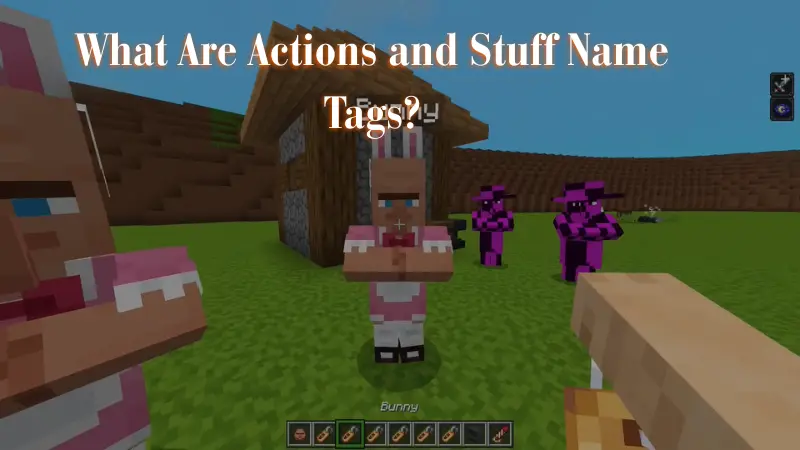
Nearly every mob in Minecraft has at least one specific name tag that makes an adult look like a baby version, on top of the generic “Baby” tag that works on anything: Players interested in expanding their Minecraft experience can explore Jenny Mod to learn about its features, compatibility, and installation requirements.
| Mob | Name Tags |
| Armadillo | Pup, Dylan |
| Axolotl | Lottie |
| Bee | Smol, Bumble |
| Camel | Calf, Camelo |
| Cat | Kitten, Kitty |
| Cow | Calf, Mr Mooch |
| Dolphin | Calf, Flippy |
| Donkey | Foal |
| Drowned | Splashy |
| Fox | Kit |
| Glow Squid | Glowling, Twinkle |
| Goat | Kiddo |
| Hoglin | Hoglet, Hoggin |
| Horse | Foal |
| Husk | Sandy |
| Llama | Cria, Kira |
| Mooshroom | Mooshling, Mooshy |
| Mule | Foal |
| Panda | Cub, Bao |
| Pig | Piglet, Lil Chop |
| Piglin | Piglet |
| Polar Bear | Cub, Knut |
| Rabbit | Bunny, Thumper |
| Sheep | Lamb, Wooly |
| Skeleton Horse | Foal, Rattle |
| Sniffer | Hatchling, Snifflet |
| Squid | Squidling, Inky |
| Strider | Stridling, Sizzle |
| Trader Llama | Cria, Spitty |
| Turtle | Hatchling, Bubbles |
| Villager | Child, Nosey |
| Wolf | Puppy |
| Zombie Horse | Foal, Rumble |
| Zombie Pigman | Piggly |
| Zombie | Rotty |
Rare Natural Spawn Variants (Secrets)
Beyond name tags, a handful of special mob variants can spawn naturally with a small random chance — or you can guarantee one with the right name tag instead of waiting:
| Secret Variant | Natural Spawn Chance | Name Tag Shortcut |
| Baby Enderman | 0.5% | Baby, Enderchild, or Endie |
| Green-Eyed Enderman | 0.3% | Beanie or Green |
| Golden Allay | 10% | Goldie |
| Mummy Husk | 3% | Mummy or Dusty |
| Pink Dolphin | 1% | Bubblegum |
| Rare Zombie (“Brian”) | 0.05% | Brian or Glare |
| Iron Golem in a Suit | Not a natural spawn | Dapper or Agent |
| Friendly Chicken Jockey | Not a natural spawn | Chicken Chicken Jockey |
| Meme Cat Variant | Not a natural spawn | Oiia Oiia |
The Green-Eyed Enderman is a small nod to Minecraft history — Endermen originally had green eyes in very early development before Mojang changed them to purple, so this variant brings that early look back as an optional Easter egg.
Happy Ghast Harness Colors and Designs
Every one of the 16 harness colors has its own unique design rather than just a plain color swap, and a couple even carry their own special animation:
| Harness Color | Design |
| White | Woolly Hat |
| Orange | Pumpkin |
| Magenta | Shulker Box |
| Light Blue | Allay (has a unique animation) |
| Yellow | Bee |
| Lime | Turtle |
| Pink | Axolotl |
| Gray | Miner |
| Silver | Warm Frog |
| Cyan | Warden |
| Purple | Enderman |
| Blue | Default Style |
| Brown | Creaking |
| Green | Leafy |
| Red | Fine Gentleman |
| Black | Ender Dragon (has a unique animation) |
Happy Ghast Hot Air Balloon Name Tags
A separate set of name tags turns a Happy Ghast into a floating hot air balloon instead of a harness-based mount:
- Creeper Balloon, Enderman Balloon, Pig Balloon, or Pumpkin Balloon — apply one of these to a Happy Ghast, leash a boat to it, crouch and click the Ghast, and it lifts off as a themed hot air balloon. A harness is still needed to actually ride it.
- The same balloon name tags also work on a Ghastling (the baby form), which you can then leash for a smaller, hand-held balloon effect.
- Saddleless — apply this name tag after a harness is already fitted to ride without the harness being visually shown.
Armor Stand Props List
Several of the pack’s custom 3D held items are designed to look good displayed on a Minecraft armor stand, effectively working as decorative props for builds — items like the Dried Ghast, certain music discs, and other custom 3D models are built with this kind of display in mind. Placing these items in an armor stand’s hand slot is the standard way to show them off as a static decoration rather than holding them yourself. Combined with a name tag armor stand setup — nametagging the mob or item beforehand — you can display specific rare variants and props side by side for a themed build.
Expressions: Facial Animation Secrets
Actions and Stuff added a facial animation system called Expressions, which adds blinking, animated pupils, and eyebrow movement to characters during animations. This isn’t tied to a name tag — it runs automatically — but it extends to custom skins as well, meaning skin creators can build Expressions-compatible skins that blink and emote along with everyone else.
How to Use a Name Tag in Minecraft
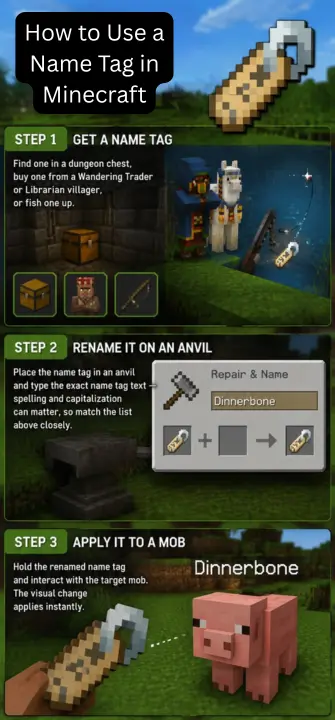
Step 1: Get a Name Tag
Find one in a dungeon chest, buy one from a Wandering Trader or Librarian villager, or fish one up.
Step 2: Rename It on an Anvil
Place the name tag in an anvil and type the exact name tag text — spelling and capitalization can matter, so match the list above closely.
Step 3: Apply It to a Mob
Hold the renamed name tag and interact with the target mob. The visual change applies instantly.
Frequently Asked Questions
Conclusion
Between baby mob name tags, rare natural variants, Happy Ghast harness designs, hidden balloon transformations, and the Expressions facial animation system, Actions and Stuff hides an enormous amount of Minecraft secrets behind a simple anvil and a name tag. Keep this list handy next time you’re playing, and try a few out on your own world.