
Actions and Stuff for Java Edition? Here’s What Actually Works
You search for Actions and Stuff, install it on your Java Edition world, and nothing happens — no new animations, no sulfur cave glow, nothing. That’s not a bug on your end. Actions and Stuff Minecraft Java compatibility simply doesn’t exist — the pack was built specifically for Minecraft Bedrock Edition. This page explains exactly why, and points you to the closest working alternatives for Java players who want that same smoother, more animated feel.
Is Actions and Stuff Available for Minecraft Java Edition?
No. Actions and Stuff is a Bedrock-only resource pack, and there is no official Actions and Stuff Java Edition port, no matter which build you’re thinking of — this has been true since early versions like 1.9 and remains true today. Some Java modpacks and resource packs use the “Actions and Stuff” name because they’re inspired by it, but none of them are the original pack — they’re community recreations built entirely from scratch for Java’s different systems.
There is also no Actions and Stuff mod for Java, since the original was never built as a mod even on Bedrock — it’s a resource pack there too. If you’ve seen an “Actions and Stuff mod Java” file somewhere, it’s almost certainly one of the fan-made recreations covered below, not the original.
Why Actions and Stuff Doesn’t Work on Java Edition
Minecraft Bedrock and Minecraft Java Edition are built on completely different codebases, even though they share the same name and most of the same blocks. Bedrock resource packs use their own animation and entity file formats, while Java Edition relies on a separate system built around Java mods and Java-specific resource pack structures.
Because of this, a Bedrock resource pack like Actions and Stuff can’t simply be copied over to Java — the animation files, mob models, and particle systems would all need to be rebuilt from the ground up using Java’s tools before anything would actually work.
This is the same reason so many Bedrock-exclusive resource packs and marketplace add-ons never make it to Java, and why Java-exclusive mods rarely get an official Bedrock release either. The two editions have stayed on separate development tracks for years, and animation systems in particular are one of the areas where that gap shows up the most — Bedrock leans on its own entity animation controllers, while Java’s approach is built around its own rendering pipeline that Fabric and Forge mods hook into directly.
Best Java Edition Alternatives to Actions and Stuff
If you’re looking for an Actions and Stuff resource pack Java version, or even an Actions and Stuff texture pack Java equivalent, these are the closest real options the Java community has built:
Fresh Animations (Resource Pack)
The closest match in spirit to Actions and Stuff. Fresh Animations adds dynamic movement to mobs and entities — cows graze, chickens peck at the ground, wolves wag their tails, and many other small touches bring the world to life. Like Actions and Stuff, it’s a resource pack rather than a mod, so it installs the same simple way as any other Java texture pack, and it needs nothing beyond the base game to work.
Because it only touches visual files, Fresh Animations also shares one of Actions and Stuff’s biggest advantages: it works on any server, since the animations only render on your own screen regardless of what the server itself is running.
Mo Bends (Player Animation Mod)
Where Fresh Animations focuses on mobs, Mo Bends focuses on the player. It reworks walking, running, swimming, and combat with realistic joint bending, giving your own character the kind of weighted movement Actions and Stuff adds on Bedrock. Sword swings, bow draws, and even simple actions like eating get their own distinct motion instead of one generic animation reused everywhere.
Unlike a resource pack, Mo Bends is a mod, which means other players on a server only see your new animations if that server also has the mod installed. On singleplayer or a server you control, this isn’t a concern at all.
Emotecraft (Emotes and Gestures Mod)
Adds dances, gestures, and custom animations you can trigger yourself. It’s especially popular on multiplayer servers and with content creators who want expressive character movement beyond the default game.
Additional Animation Library Mods
A few other mods add specific animations — eating, drinking, using maps, climbing ladders, and similar small actions — and work well layered on top of the mods above. Some of these are library mods, meaning they don’t do much by themselves but are required by other animation mods to function.
How These Alternatives Compare to Actions and Stuff
| Feature | Actions and Stuff (Bedrock) | Fresh Animations | Mo Bends | Emotecraft |
| Platform | Bedrock Edition | Java Edition | Java Edition | Java Edition |
| Type | Resource pack | Resource pack | Mod | Mod |
| Mob animations | Yes | Yes | No | No |
| Player animations | Yes | No | Yes | Yes (emotes) |
| Combat animations | Yes | No | Yes | No |
| Works on any server | Yes (client-side) | Yes (client-side) | Only if server has the mod | Only if server has the mod |
| Cost | Free | Free | Free | Free |
How to Install Actions and Stuff on Minecraft Java (and Why You Can’t)
There’s no Actions and Stuff Java download to install, since the file itself doesn’t exist for this edition — searching for one will only turn up unofficial recreations or, worse, unrelated files mislabeled to attract clicks. What you can install instead are the genuine Java alternatives above. Here’s how:
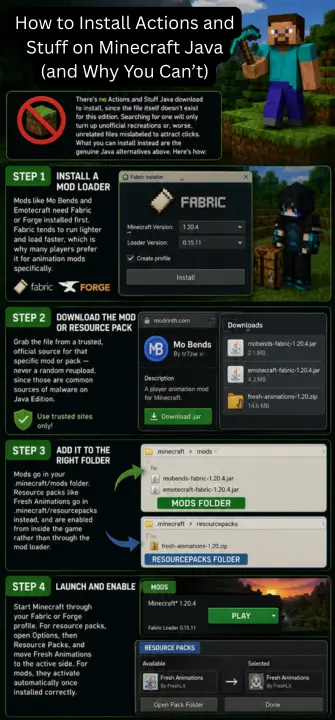
Step 1: Install a Mod Loader
Mods like Mo Bends and Emotecraft need Fabric or Forge installed first. Fabric tends to run lighter and load faster, which is why many players prefer it for animation mods specifically.
Step 2: Download the Mod or Resource Pack
Grab the file from a trusted, official source for that specific mod or pack — never a random reupload, since those are common sources of malware on Java Edition.
Step 3: Add It to the Right Folder
Mods go in your .minecraft/mods folder. Resource packs like Fresh Animations go in .minecraft/resourcepacks instead, and are enabled from inside the game rather than through the mod loader.
Step 4: Launch and Enable
Start Minecraft through your Fabric or Forge profile. For resource packs, open Options, then Resource Packs, and move Fresh Animations to the active side. For mods, they activate automatically once installed correctly.
Do These Alternatives Work Together?
In most cases, yes. Fresh Animations is a resource pack, so it can run alongside mods like Mo Bends and Emotecraft without conflict, since they affect different systems. Running two separate player-animation mods together is more likely to cause issues, so it’s worth testing one at a time if you’re combining several.
If you’re building a full animation-focused modpack, a common combination is Fresh Animations for the world and mobs, Mo Bends for player combat and movement, and Emotecraft layered on top purely for optional gestures — together covering most of what makes Actions and Stuff feel complete on Bedrock.
Which Minecraft Java Versions Are Supported
Support varies by mod and updates over time, so it’s worth checking each mod’s own page for the exact Java version it currently supports, including recent releases like 1.21.4 and 1.21.5. Fabric and Forge both publish version-specific builds, and installing the wrong one for your Minecraft version is the most common cause of a mod failing to load.
Frequently Asked Questions
Common Problems When Setting Up Java Animation Mods
Mod Doesn’t Load After Install
This almost always means a version mismatch — double-check that the mod build, your Fabric or Forge version, and your Minecraft version all match exactly. Mixing versions is the single most common cause of a mod silently failing to appear in-game.
Resource Pack Shows a Red Exclamation Mark
This warning means the pack was built for a different Minecraft version than the one you’re running. It will often still work, but some textures or animations may be missing or look incorrect until an updated build is released.
Animations Look Choppy or Don’t Play
For Mo Bends specifically, this is sometimes caused by another mod also trying to control player animations. Try disabling other animation-related mods one at a time to find the conflict.
Conclusion
If you came here expecting to run Actions and Stuff on Minecraft Java Edition, the short answer is that it isn’t possible — the pack is built specifically for Bedrock and doesn’t translate across. The good news is that Java’s modding community has built genuinely strong alternatives. Fresh Animations covers mob and world animation, Mo Bends handles player movement and combat, and Emotecraft adds expressive gestures on top. Combined, they get Java players remarkably close to the experience Actions and Stuff delivers on Bedrock.